Table of Contents
Types of Discord Bots (And Some of My Favorites)
2. Security and Moderation Bots
What About Custom Discord Bots?
How to Add and Set Up a Discord Bot
Which Bots Does Your Discord Server Actually Need?
Small or New Communities: Start with the Essentials
Midsized Communities: Growing Past the Early Days
Large Professional Communities: Build for Scale
A Few Warnings About Discord Bots
Best Practices for Bot Permissions
1. Limit Each Bot's Permissions
3. Limit Who Can Use Bot Commands
Making the Most of Your Discord Server
Need a Hand Setting Up Your Discord?
Intro to Discord Bots
If you're setting up a Discord server, you've probably discovered that there's a bot for just about everything.
Need help moderating chat? There's a bot for that. Want to welcome new members with FAQs? Bot it.
Organizing support tickets, running giveaways, or rewarding members with points for chatting? There are bots for all of those things, too.
There are thousands of Discord bots available, many offering excellent features entirely for free. With the right tools, you can automate much of the repetitive administrative work and spend more time doing the things that make your community worth joining.
I'm Dillon from ModWise, and I've spent years building, managing, and securing online communities for gaming, technology, and digital brands. I've been a member of hundreds of Discord servers, and worked with dozens from small communities to professional projects with hundreds of thousands of members.
There's no perfect combination of bots for every community. And while a new bot with a dozen features can be tempting, installing everything that looks useful is a good way to create a mess.
In this blog, we'll take a look under the hood of Discord bots — the good kind! We'll explore answers to a few common questions:
- Which bots do I need for my Discord server?
- What are some of the best Discord bots available?
- How do I add and set up a Discord bot?
- What should I consider before giving a bot access to my server?
- And perhaps a few considerations you hadn't thought of yet.
My goal is to help you understand what's available so you can make good decisions for your own community, and feel more confident about the tools you choose.
What Is a Discord Bot?
Simply put a Discord bot is an application that performs tasks within Discord.
Bots can respond to commands, monitor actions, assign roles, read messages, schedule server events, and handle all sorts of routine administrative work. More sophisticated bots can integrate with external services like support systems or websites, and perform complex actions based on events happening inside or outside your server. Discord's supported bot system is designed specifically for applications and comes with its own permission and authorization controls. You can use Discord's Developer Portal to manage applications and servers you control.
"Good Bots" as I affectionately call them, are not to be confused with botted accounts, commonly also called 'bots', which are automated ordinary user accounts. These are often used by bad actors for things like mass joining, spam, scams, or artificially inflating member counts. For clarity, I refer to botted accounts as "bot-users" or "self-bots".
There's a reason bots are so popular: they save time and multiply efforts.
If you find yourself repeatedly answering the same question, assigning the same roles, or manually copying updates from one platform to another, there's a good chance a bot can do that work for you.
And in many cases, setting one up is easy.
Types of Discord Bots (And Some of My Favorites)
While there are thousands of bots available, most fit into five general categories.
Many are free, or offer generous free plans. Others provide premium features that may be worth paying for as your community grows.
I've included several of my favorite reputable bots in each category, along with some features that make them useful.
1. General Purpose Bots
These are the Swiss Army knives of Discord.
General-purpose bots usually provide a broad range of features, including moderation commands, welcome messages, role assignments, logging, custom commands, and a mixed bag of other features their devs put together.
For most servers, a good general-purpose bot is one of the first things I'd install. A single application can often handle jobs that would otherwise require several separate bots.
Some of my favorites:
- Dyno — One of the established names in Discord Bots. Features include role management, automated link filters, message automation and deletion tools, and simple custom commands. Its web dashboard makes it relatively easy to configure and manage. Dyno is my standard choice for basic logging, automatic messages, starboard, and other useful features.
- ProBot — A helpful bot offering embed builders, customizable welcome images, self-assignable roles, leveling, and more. Particularly attractive for a more personalized welcome experience or its easy xp system.
- Carl-bot — An excellent option for reaction roles, custom commands, logging, automated moderation, and configurable messages. Its role management features are especially useful for helping members select interests or access different parts of your community.
- Sapphire — A highly customizable bot with moderation, logging, automated messages, custom application commands, and other features. Worth exploring if you want more flexibility over your server's automated interactions. I've come to really like Sapphire's logging and 'sticky message' feature, making sure a message stays visible at the bottom of a channel always.
These bots' features overlap considerably, so in most cases, they come down to preference (and I wouldn't blame you for picking Carl-bot just because it has a cute turtle logo. Or I suppose NOT choosing it for the same reason.)
I generally recommend choosing one primary general purpose bot, then adding specialized tools where necessary. Alternatively, test one or two, and use both for specific features while disabling the others.
2. Security and Moderation Bots
Security is one of my biggest design decisions when building a Discord server.
While Discord has made improvements on native tools to protect your server, specialized security bots can provide additional capabilities for communities facing greater risks.
Security bots may help identify suspicious accounts, prevent spam and raids, detect impersonators, or monitor potentially destructive actions by members with elevated permissions.
I also use my security bots to create verification gates, something I'll cover in another blog about Setting Up a Discord Server. Security isn't about creating mazes or hoops for scammers and hoping real members make it through — rather security should be nearly invisible and create as little friction to normal users as possible.
Some of my favorites:
- Wick — One of the more sophisticated security bots available. Wick specializes in anti-raid protection, automated moderation, verification, and anti-nuke systems that monitor potentially destructive administrative actions. This is standard in all professional servers I build.
- Hashbot — Particularly useful for communities targeted by impersonators and scams. Hashbot offers suspicious-name detection, profile image matching, and filters designed to identify accounts imitating trusted people or organizations. While Hashbot is a premium tool best for larger servers, it's part of the Hashbot Safety Suite, and I've had great experiences using the other free specialized tools.
- Good Knight — Provides additional security controls around privileged actions and compromised accounts, including tools such as temporary permissions, protected commands, and emergency controls.
- Discord's built-in security tools + logging — Don't overlook this option! Discord's native AutoMod, verification settings, Rules Screening, and raid protection can provide a solid foundation. Combined with logging through a general-purpose bot, they may be entirely sufficient for smaller communities.
Please note that simply installing a security bot doesn't necessarily make your server safer.
Security bots generally require more setup than other bots, and it's worth the effort to get it right. They're also only one component of server security. Having seatbelts in your car doesn't prevent crashes, and they do nothing if you don't fasten them properly. However they will save your life when things go wrong.
I encourage you to not let the learning curve prevent you from using even basic security practices and automations, and seeking expert advice or service before the risk gets out of hand.
3. Support and Ticket Bots
Once a community becomes active, keeping up with questions, bug reports, account problems, and member requests can become a job of its own.
Ticket bots help organize these conversations by creating private support requests that staff can review and resolve. They're especially helpful when conversations require personal information or sensitive discussion between team members and community members.
Some of my favorites:
- Ticket Tool — A capable ticket management bot with configurable ticket panels, transcripts, staff workflows, and a web dashboard. Offers free functionality with additional features through paid plans.
- Helper.gg — Provides configurable support tickets, logs, staff management, and dashboard-based ticket handling. Useful for teams that want to organize support responsibilities.
- Tickets — A dedicated ticket platform supporting forms, transcripts, ticket claiming, multiple support teams, and advanced customization, including white-label options. This is my go-to ticket bot for most servers.
There are some great support systems available through these bots, but remember that every new ticket is somebody expecting a response, so make sure you can commit to answering tickets before creating a system for them.
If you're handling dozens of account issues, bug reports, and moderation appeals, tickets can make your life considerably easier. The decision comes down to whether the system saves more work than it creates.
Remember: Staff and mods should NEVER be using private Direct Messages to conduct official business, as doing so opens up many doors for problems.
4. Utility Bots
Utility bots are some of my favorite tools because they solve particular problems without requiring much ongoing attention. They often perform one specific role better than a general purpose bot, or have a very unique feature I've often found helpful.
Need to know where your new members are coming from? Want to automate a custom command? Interested in understanding how people actually use your server?
There's probably a simple utility for it.
Some of my favorites:
- Statbot — Provides analytics on message activity, voice participation, and other server statistics. Useful for spotting activity patterns and understanding how members use different parts of your community.
- Invite Tracker — Tracks invite usage and helps identify where new members are coming from. Particularly helpful for community partnerships, referral campaigns, and promotional efforts. I personally pair Invite Tracker with a simple spreadsheet to create a Discord UTM-like tracking system.
- Custom Command — Lets you create custom commands and automated workflows without developing a complete bot yourself. Supports configurable triggers, responses, and functions that can handle a wide variety of administrative tasks. Very powerful, but very advanced.
- Craig — Craig records voice chats and stages in your Discord, which can be really helpful for when you have something to share over audio, but not everyone can attend live. Pairing it with an audio-to-text tool can even convert the recording to a text transcription. A great example of a simple array of free tools.
There are plenty of other useful tools, including scheduling bots, social media feeds, reminder systems, and integrations with platforms like Zapier that allow workflows with external platforms.
If you can identify a repetitive problem, there's probably a specialized tool or series of tools that can solve it.
Once I started exploring bots and creating my own systems, I could take tasks that used to require 2-3 support techs hours of work per day, and automate the problem away. Classic "work smarter, not harder."
All it took was knowing a tool existed, and the right setup.
5. Fun and Engagement Bots
Now for the fun stuff.
The Discord developer community has created a remarkable collection of games, leveling systems, music bots, trivia, and virtual economies that can add personality to your community.
I've seen a simple Discord game or a well-run event turn quiet lurking members into regular contributors. Sometimes all it takes is giving people something entertaining to do together.
Some of my favorites:
- Lurkr — A leveling and activity rewards bot with leaderboards, rank cards, and role rewards. Useful for recognizing participation and giving members a little sense of progression.
- Jockie Music — A music bot for Discord voice channels, including support for multiple listening sessions. Handy for casual hangouts, gaming sessions, and community gatherings.
- UnbelievaBoat — My favorite economy bot, offering virtual currencies, shops, custom reward items, minigames and social interactions. You can build some surprisingly engaging systems around it and I've spent hours creating custom economies and events with this bot. People LOVE to use it.
- Quizcord — A trivia bot that supports quizzes and custom questions. Great for community interaction, education disguised as fun, and the occasional battle over useless knowledge.
- RPG and adventure bots — There are countless bots with collecting, battling, progression, and adventure mechanics. Particularly appealing in gaming communities where members already enjoy those kinds of activities. Paired with a leaderboard or prize pool, these are really great ways to enjoy the community with some casual fun.
A little creativity goes a long way here.
If you're running a fantasy RPG community, perhaps an economy built around gold coins and collectible items would fit the theme. A developer community might enjoy weekly trivia or coding challenges. A gaming community may simply want a social place to enjoy music and a recurring game night to build relationships.
I'd also be careful about adding too many rewards or games. Creating a Discord economy also creates expectation from the players. Putting a game bot in general chat can interrupt normal conversation.
So just be mindful of how you set up these systems.
The important thing is choosing activities that make sense for your audience.
Note: If your favorite bot isn't in this list, shoot us a message to let us know why you choose it over our picks! If you're a bot dev building exceptional bots, we'd be happy to demo your work.
What About Custom Discord Bots?
Ah yes, "custom" — the word that often means, "Like the thing that already exists, but a little different, and costing way more time and money".
Here's the scoop with custom bots:
With all the excellent free and premium bots available, with enough creativity you can build some remarkably advanced systems without writing a line of code.
In most cases, somebody has already built an application that does what you need. Seldom do most projects truly need a bespoke tool.
Maybe your game needs to verify players' purchases against a private database. Perhaps you're managing a premium membership community where access is granted after login to your website. Or you've got a recurring administrative problem that existing bots don't quite handle.
That's where custom bots come in.
A custom bot can be built around your exact requirements, including:
- Connections to external APIs, databases, or websites.
- Unique member verification and role assignment systems.
- Custom games, commands, and engagement tools.
- Branded interfaces and messages.
- Specialized logging and administrative workflows.
- Greater control over hosting, code, and data handling.
Of course, custom development also burdens you with responsibility. You need somebody to maintain the bot, keep its dependencies updated, manage hosting, and address problems as they arise.
For most communities, I wouldn't recommend commissioning a custom bot unless there's a good reason to do so.
At ModWise, we've developed custom bots because we encountered problems that existing bots didn't adequately solve. Some are relatively simple quality-of-life improvements, while others involve much more specialized automation.
We also make selected custom tools available to our partners.
One bot we created is a free ModWise Audit Bot that reviews a Discord server's configuration, including permission settings and administrative access, and provides recommendations to improve security. This was a custom bot that saves me time, and gives others a free starting point to assess their existing servers for vulnerabilities.
How to Add and Set Up a Discord Bot
Thankfully, you don't need to be a developer to install most Discord bots.
Many have websites with dashboards that make setup relatively painless, and some run right out of the gate or with a simple setup command.
Here's the basic process:
- Find the bot. Visit its official website or find the application through Discord's App Directory. Make sure you're installing the correct application, particularly with popular bots that may have imitators.
- Authorize it for your server. Click the installation or invite button, select your server, and review the requested access. You'll need appropriate server management permissions to install server-wide applications.
- Review the permissions. Pay attention to what the bot is requesting. A simple music bot shouldn't need the same access as an advanced security system.
- Complete the installation. Once authorized, a server-installed bot account should appear in your server's member list.
- Configure its settings. Most bots provide a web dashboard, Discord slash commands, or both. Set up the features you need and disable anything you don't plan to use.
- Test it. Make sure commands work, logs go to the right channels, and ordinary members can't access administrative functions.
Sometimes bots request administrator permissions in your server because this makes setup easier. While the convenience is tempting, best practice is to give the bot only access to the permissions and channels it needs, and remove admin permissions once the bot is in your server.
It's also crucial to understand role hierarchy. When a bot is added to your server, a bot role is created for it.
A bot generally cannot moderate members whose highest roles are equal to or above its own highest role. Similarly, role-management bots can't assign roles that are above their own position.
There's a lot of nuance in setting up bots, but in general, it's best to leave fun and general purpose bots low in the role list, move moderation bots just above the highest role normal members will receive in your server, and avoid giving administrator permissions to a bot unless you know why they need them.
If you're configuring a new server, use a separate test account without staff permissions to see what an ordinary member experiences. Discord's View Server As feature is also useful for checking channel and role visibility.
Which Bots Does Your Discord Server Actually Need?
Now that we've covered some useful tools, let's talk about how to choose them.
Server size matters, but I wouldn't make decisions based entirely on total member counts. Plenty of servers have over 1000 members with zero activity.
I typically define "active members" as anyone who has commented, reacted in or visited your server in the past 30 days.
A new Kickstarter community with 150 members has different requirements from a private gaming group of the same size. A cryptocurrency project may attract scammers before it has its first hundred members, while a casual hobby server with several thousand members might operate comfortably with relatively basic tools.
I look at the server's purpose, its expected activity, what the staff needs to accomplish, and where it's likely to bottleneck.
So here's how I'd categorize three different community types
Small or New Communities: Start with the Essentials
Examples: Small hobbyist servers; Early Kickstarter communities; Small online businesses; Playtest groups.
Estimated size: 50-1000 active members
If your server is small and simple, so should your bot tools be.
Small or brand new servers usually only need a simple security gate to discourage waves of 'bot-users', simple anti-spam to prevent malicious links being shared, and perhaps a general purpose bot with welcome messages sharing answers to FAQs so users can find info without there being full time mods to answer questions.
I'd generally recommend starting with:
- General Purpose: Dyno, ProBot, Carl-bot
- Security: Discord's native Automod with basic anti-spam filters, and simple server logging. Perhaps a volunteer mod or two.
- Support: A simple help or questions channel.
- Utility: Usually the tools from your general purpose bot are enough. Perhaps Invite Tracker for early data.
- Fun: A welcoming environment and personal interaction.
Imagine a new Kickstarter project launching a community for early supporters:
At this stage there's likely not much to automate, so you don't want to be managing bot systems for 10-250 people who spend a few hours per week in your server.
You also don't want to have a 10-step process to start chatting in the server, and 20 channels with little to no activity.
Your channels should probably be limited to announcements, general discussion, a place for questions, and perhaps a channel to share smaller updates that aren't full announcements.
Visitors should be able to join, understand what the server is about, find important information, and begin participating without unnecessary friction. These early members are crucial for establishing your community culture.
Even if you're just starting, security is still important from day one. Review permissions, enable appropriate verification, configure spam filtering, and make sure your important administrative actions are logged.
Keep the visible experience simple, with sensible security working behind the scenes.
Midsized Communities: Growing Past the Early Days
Examples: Established indie game communities; quickly expanding brands; large transplant communities from another established social platform; Servers with regular monetized events or frequent support requests.
Estimated size: 1000-10,000 active members
Once a community grows to a larger activity community or becomes a hub for established businesses, new problems begin appearing.
Staff may spend a lot of time answering repetitive questions. Bug reports get buried in chat. Events need coordination, and scammers start targeting you because you're higher profile.
This is when specialized tools can make more sense.
I'd consider:
- General Purpose: Continue using your preferred bot. Check what advanced features might exist you didn't need before.
- Security: By this time I'd strongly suggest Wick with the proper time to set up and learn how it's used. Logging needs to be thorough to identify sneakier scams and to deal with issues.
- Support: Ticket Tool, Helper.gg, or Tickets if support demands are becoming difficult to track.
- Utilities: Statbot, Invite Tracker, or Custom Command depending on automation and data needs.
- Engagement: Lurkr, Quizcord, or another activity bot that fits your members' interests.
This is also where I'd recommend regular moderator presence from at least 1-3 mods. Mods can be made of volunteers who have been reliable helpers within your community, or you can look to hire or consult with experienced professional mods like those in ModWise.
Your mods need to be naturally helpful and patient, understand the community, and have a history of professionalism even when it wasn't expected of them. My personal policy is to never promote a mod from the community before you've seen 6 months of steady activity from them. Of the dozens of mods I've worked with over several years the only times I've ever had issues is when I broke this rule.
Mods can help answer questions, welcome newcomers, and propagate the culture you've worked to establish; and they're likely to be one of the greatest impactful additions to your server's operations - more effective than most bots.
You might also introduce a voice channel for occasional hangouts, regular trivia nights, or scheduled game events which by this point are likely becoming staples of your community, and which a mod can help you run.
At this stage, the best bot additions are the ones that save time, improve organization, or give members something genuinely 'sticky' to participate in. You've proven people are interested in your community - it's about keeping their attention and continuing to scale with minimal growth pains.
Large Professional Communities: Build for Scale
Examples: Viral gaming companies, commercial communities, mainstream brands, and projects with dedicated moderation and support teams.
Estimated size: 10,000-100,000 active members
As a community becomes larger and more complex, Discord may serve several functions for the organization.
It might be a customer support center, an announcement platform, a place for events, and an important connection between a company and its customers. It's a full time job, and by this time I hope you have a Community Manager running your day to day operations and coordinating your mod team.
At this scale your staff to member ratio could be upwards of 1:2000 so of course force multipliers like bots are the only way to manage everything with sanity.
Professional scale setups:
- General Purpose: By now you may have decided to pay for premium features for your bot, or you may even consider a custom bot or custom branding for your server to meet your specialized needs.
- Security: Advanced protection protocols through tools such as Wick, Hashbot, or Good Knight. Do not cut corners here.
- Support: A structured ticketing system with Ticket Tool or Tickets.bot. I've installed both for redundancy in some high-demand periods.
- Utilities: Analytics, social media feeds, and integrations with other external systems. Custom bots can do a lot of lifting in this category.
- Engagement: Scheduled events, giveaways, leveling systems, community games, or economies can really keep a large community busy and attentive. I really like Lurkr and Unbelievaboat as underlying systems, and I also use ModWise's custom bot for advanced engagement systems and reward loops.
Remember that a large server doesn't necessarily need every kind of bot. Some professional communities have extensive customer support requirements but little need for games or virtual economies.
Others are heavily focused on social engagement, where events and activities are central to the experience.
Choose your tools based on how your community operates today and where you expect it to be tomorrow.
At this larger scale is where issues with bot configuration, team permissions, and operating procedures become particularly noticeable. Scammers will test the fences. Systems will be tried. Previous unknown limitations will be encountered and require changes in plan.
But with the right tools and people, it's very rewarding to create and run a well-oiled community.
Quick Comparison
| Bot category | Small / New | Established | Large / Professional |
|---|---|---|---|
| General Purpose | Common | Essential | Essential |
| Native Automod Security | Essential | Essential | Essential |
| Advanced Bot Security | Based on risk | Recommended | Strongly recommended |
| Support & Tickets | Based on need | Based on need | Commonly helpful |
| Analytics & Utilities | Minimal | Useful | Often helpful |
| Fun & Engagement | Use sparingly | Light engagement | Broader campaigns |
| Custom Bots | Rarely necessary | Special use cases | More likely to be useful |
A Few Warnings About Discord Bots
While bots are a great tool, there are a few things I strongly encourage administrators to keep in mind.
1. Security Risks
Every application you install introduces another system you're trusting with some level of access to your community.
Reputable bots are rarely compromised, but their permissions still deserve scrutiny.
Some applications require access to message content, member information, roles, or administrative functions. A compromised bot with excessive permissions can cause very serious damage to a server and its members.
Use established applications from trusted sources, review their requested permissions, and remove integrations you no longer need. And remember permissions given to bots can sometimes open you up to new attack vectors from members.
As an example, if you use a general purpose bot to grant roles, for the bot command to work it needs role management permissions. But without careful role hierarchy and setup, an exposed /add role command can allow a regular user to give themselves permissions only a mod should have, and proceed to mass scam or ban members from your server.
Exploits happen far too often, and the more complex your server, the more chances there are hidden risks like this.
If you want to understand how Discord account compromises and scams commonly work, I've written a separate guide: How Discord "Hacks" Happen and How to Stop Them.
2. Clutter and Spam
You have a good idea: Set up an automated message on a timer. Or post a link to your FAQ every time a new member joins. Or put a funny meme generator command in general chat for some laughs.
But bots are notorious for spamming channels beyond what you expected, and pushing questions and organic conversation up out of sight.
Welcome messages, level-up notifications, social media feeds, command responses, and economy rewards can quickly annoy your members by turning a pleasant chat into a wall of notifications.
I recommend putting most bots in dedicated channels, and keeping routine messages to a minimum. Many bots don't need to be visible to users at all, so they are set up to work only in a #moderator-bots channel.
3. Losing the Human Element
This is one of my bigger concerns with over-automation.
Bots are excellent at doing predictable or repetitive work. People are better at understanding context, recognizing frustration, exercising judgment, and building relationships.
While welcoming a new member with an automated message looks professional and can help get them oriented quickly, it's not a replacement for a personal, human, "Howdy and welcome! Have any questions I can help answer?" in the general chat.
In a world that's increasingly filled with AI and digital noise, people look for connection. We're relieved when we get a real person for customer support, when we don't have to cut through uncannily perfect graphics and cheesy AI lines to find information, and when the products we use are honest and reliable.
Use bots to automate the boring, repetitive work. This frees up you and your team to create real interactions with the people of your community.
Security Tip: Perform an occasional review of your installed bots. Check which applications are still needed, and what permissions they have. Remove them if they aren't needed any longer. An audit doesn't have to be complicated to be effective for decluttering and de-risking your server.
Best Practices for Bot Permissions
One of the first things I audit in a Discord server is its permission structure, including the permissions assigned to bots.
Because Discord's complex permission system is a bit of a black box, many admins never bother to learn how roles, channel overrides, and bot access interact. Or when they do they're just guessing.
But with time and patience, and maybe some pro help, once a bot is set up it's likely to save so much time and headache, you'll be glad you took the care to do it right.
Here are three practices I'd recommend for every server.
1. Limit Each Bot's Permissions
Follow the principle of least privilege: limit the bot's role to the permissions necessary to perform its intended functions.
A trivia bot shouldn't need administrator permissions, and an event scheduling bot generally shouldn't need to manage roles.
Most security bots legitimately need higher permissions and elevated role hierarchy to do their jobs. Closely follow their documentation, or seek help with setup to ensure you're setting them up correctly.
Pay special attention to permissions such as Administrator, Manage Roles, Manage Channels, and Manage Webhooks.
For an explanation of what each Discord permission does, see the ModWise Discord Permissions Resource.
2. Limit Channel Access
When determining who can see channels, the same permissions apply to bots. Just like members, a bot doesn't need access to every channel in your server.
When you add a bot to a channel, consider giving it read and write permissions in the channels it needs to access and where you want to give it commands, and explicitly blocking it from reading or sending messages in chat channels.
Be mindful that bots granted Administrator bypass normal channel permission restrictions. This is another reason not to give admin permissions to every bot, as admins cannot be prevented from seeing or sending messages wherever they like.
3. Limit Who Can Use Bot Commands
In addition to choosing where a bot can be used or seen, you can set up who has access to commands. Most reputable bots have smart default settings, which require a member have an elevated permission like 'Manage Messages' before the bot will accept their commands. But some bots don't have this guardrail, so when you add the bot to the server, all members may be able to use the commands whenever and however they like.
In addition to ensuring normal members don't have access to sensitive commands, make sure your mods and team members do have access. It's annoying when a mod goes to ban someone with the mod command and it doesn't work because the bot needs additional setup.
Many bot developers make permission management easy with a web dashboard. But each bot is different, so check their documentation first before expecting it works out of the box.
Also check out this commonly overlooked feature:
From the settings menu of your Discord, visit Integrations, and click Manage on your bot.
From there you can explicitly allow or block members or roles from each command, and choose in which channels each command can be used.
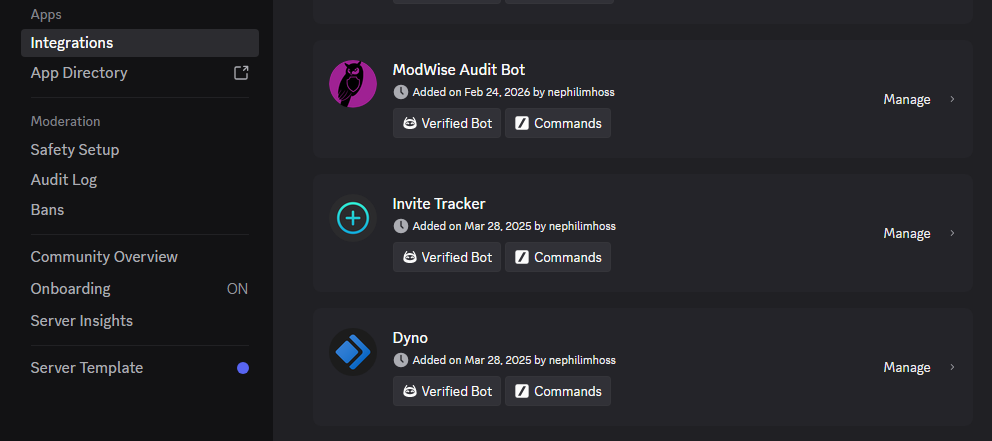
This is helpful for completely hiding commands from members so they don't have to sort through commands they might not be able to use anyway.
Making the Most of Your Discord Server
There's no universal list of Discord bots that every server should use.
The best approach is to start with your community's purpose and choose tools that make your goals easier to accomplish.
Lay the foundation of a secure, organized server; take time to engage with your community, and add bot functionality as the needs develop.
A good bot setup leads to less work and a better experience. That's the standard I'd use when deciding what belongs in your server.
Need a Hand Setting Up Your Discord?
If you're starting a Discord community and aren't sure where to begin, or you're juggling a server that's become a little more complicated than you'd like, ModWise would be glad to help.
We've spent years building, securing and managing Discord servers for gaming, technology, and online brands.
We've done the research, tried the tools, and solved the problems in professional environments.
We can help you choose and configure the right bots, tighten up your channels and roles, review permissions, and establish reliable infrastructure for your community.
A Special Offer for New Projects
For projects getting started, we're offering a one-hour consultation for $75.
We'll discuss your goals, review your needs, and help you decide how to set up your Discord without wasting time or money on unnecessary tools.
If you'd also like us to handle the setup, we offer pricing options based on server demands:
| Server setup | Additional setup price |
|---|---|
| Small startup community | $150 |
| Midsized standard community | $500 |
| Professional community | $1,500 |
These prices are for initial server setup and do not include premium bot subscriptions, custom development, or ongoing community management. Shoot us a message for more info.
Whether you need a little guidance or would rather outsource the setup to experienced hands, we're happy to talk through your goals and help you find the right solution.
Ready to Get Started?
Contact ModWise and get your community Discord built, secured, and ready for success!